
Free · no sign-up
Fantasy Town Generator
Draw a hamlet, a market town or a walled capital. Choose how its people build, put it by the sea or on a river, then name its streets and districts and give it a story. Download the map when it's done.
Surveying the ground…
What you can make
- Any size of settlement, from a hamlet of a few farms to a capital of seventy thousand, and how far it sprawls.
- Eleven ways of building: heartland, northern, Mediterranean, imperial, desert, eastern, steppe, tropical, sylvan, dwarven and orcish. Each changes the street plan, the houses, the temple, the walls and the fields around it.
- Where it stands: on a coast with a harbour, astride a river with bridges, climbing a hill, inside walls or open to the fields.
- Names for everything: its streets, districts, taverns, temple and castle, in the town's own style. Change any of them.
- A story: its history, what's going wrong there right now, the people worth meeting and the rumours in the tavern. Write it yourself or have AI write it from the map.
- A past: burn a district, ruin the temple, breach the walls, raise a new hall.
- Yours to keep: the map as a large lettered PNG, the lore as Markdown, and a town file to come back to.
A different town for every people
A building style isn't a colour swap. It decides how the town grows: whether the lanes wander or run straight, whether houses stand in terraces, around courtyards or alone, what the temple looks like, and what the walls are made of.
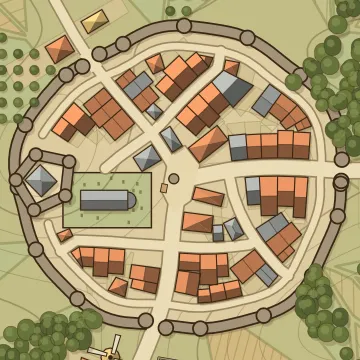
Heartland
timber terraces and a market cross
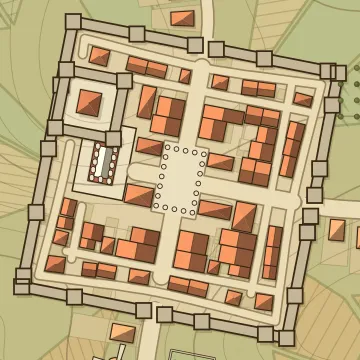
Imperial
a surveyed grid around a forum
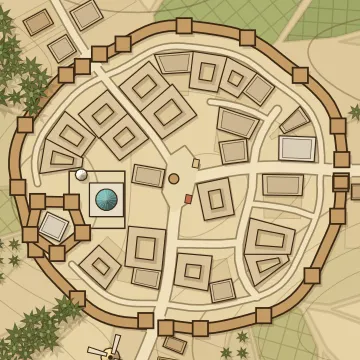
Desert
a medina of courtyard houses
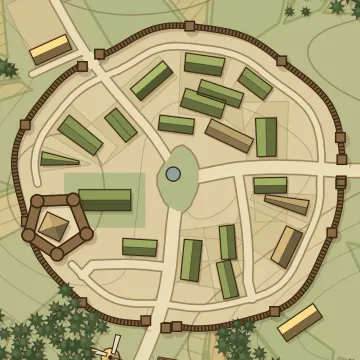
Northern
longhouses inside a palisade
The same towns players walk through
Worldtable is a place to build fantasy worlds and play in them, with an AI game master. Every town on a Worldtable world's map is drawn by this generator, from what the world map says about the ground: which side the sea is on, where the river runs, which way the roads leave. Players walk its streets, and when a story burns a district down, the map shows it. Here you can make one town on its own, for your own table.
Questions
- Is the town generator free?
- Yes, with no sign-up. Drawing towns, naming them and downloading the map cost nothing and have no limit. Only the AI-written story is rationed, to a few towns per visitor per day, because each one costs us a little to write. You can always write the story yourself.
- Can I use the maps in my D&D campaign, book or game?
- Yes. Download the map as a PNG and the lore and names as a Markdown file, and use them however you like, including in published work.
- How is the map made?
- By the same town generator that draws the towns in Worldtable's worlds. It lays the roads out of town first, then the market square, the temple and the castle, then the walls with gates where the roads cross them, then the side streets and the houses along them. The building style decides how it's laid out and built: winding lanes and terraces, a surveyed grid, a desert medina, longhouses inside a palisade, yurts on the steppe.
- Can I name the streets and districts?
- Yes. Every named street, district and place starts with a name that fits the town's style, and you can type over any of them, in the list or by clicking it on the map. Redrawing the streets keeps your names on the main roads and districts they belonged to.
- Will my town still be here if I come back?
- It's kept in your browser until you start a new one. To keep it for good, download the town file: open it here again any time to carry on editing.
- What is a burg?
- Map makers use "burg" for any settlement on a fantasy map, from a hamlet to a capital. This generator makes one burg in detail: its streets, walls, districts, landmarks and the people in it.