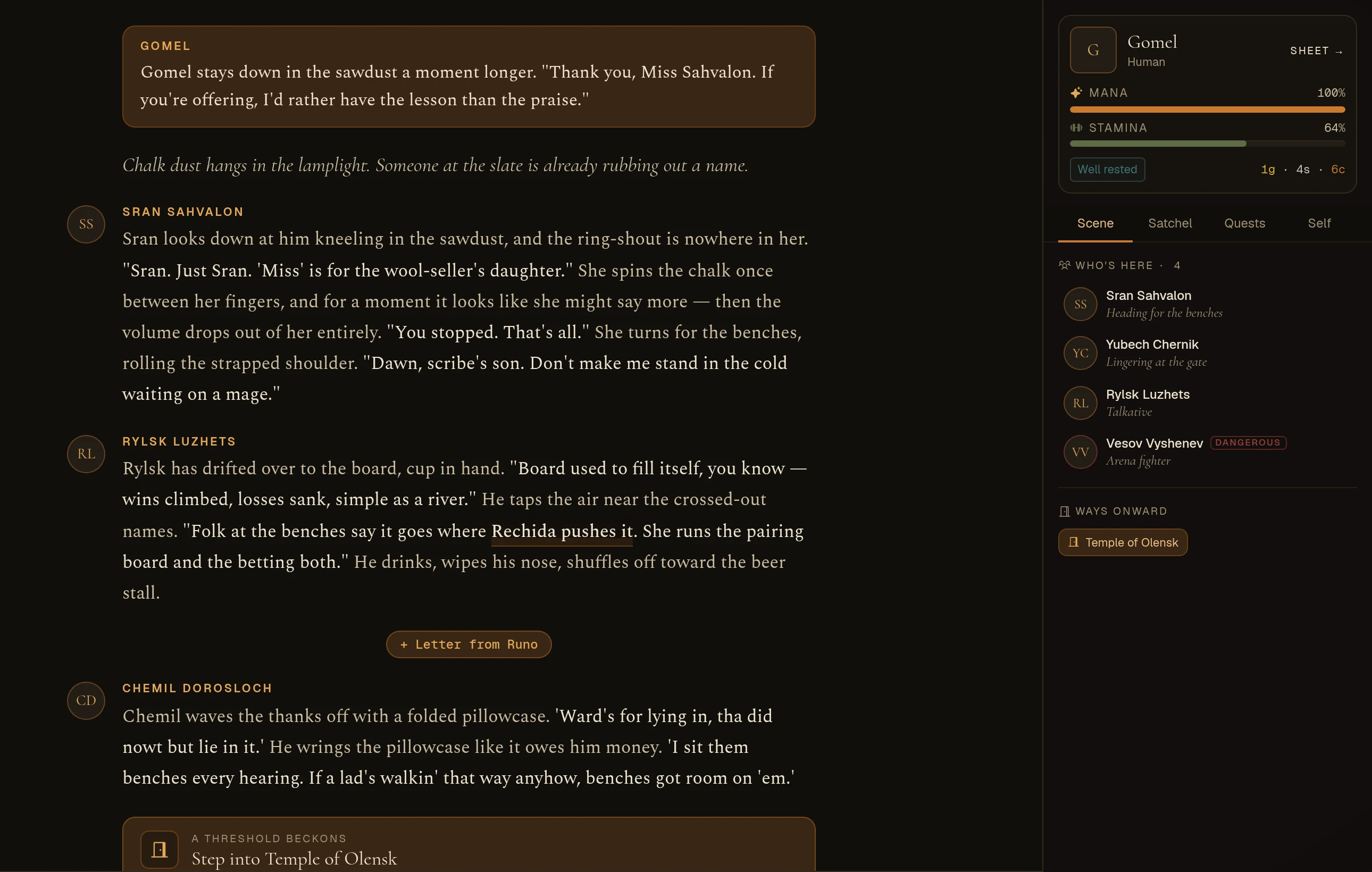
A page that reads like a book
The story reads like a book, your satchel, quests and magic sit beside it in tabs, fights get a stage, phones get room, and back goes where you came from
The page you play on has been redesigned. The story now reads like a book instead of a chat window. Everything about your character, from your satchel to your magic, sits beside it in tabs, so you never have to leave the scene to check something. Fights get a proper stage, phones get room to breathe, and the back arrow finally takes you where you'd expect.
The story reads like a book
- One column, one measure. Everything in the story now sits in a single centred column at a comfortable reading width. No more lines that run the whole width of a big screen.
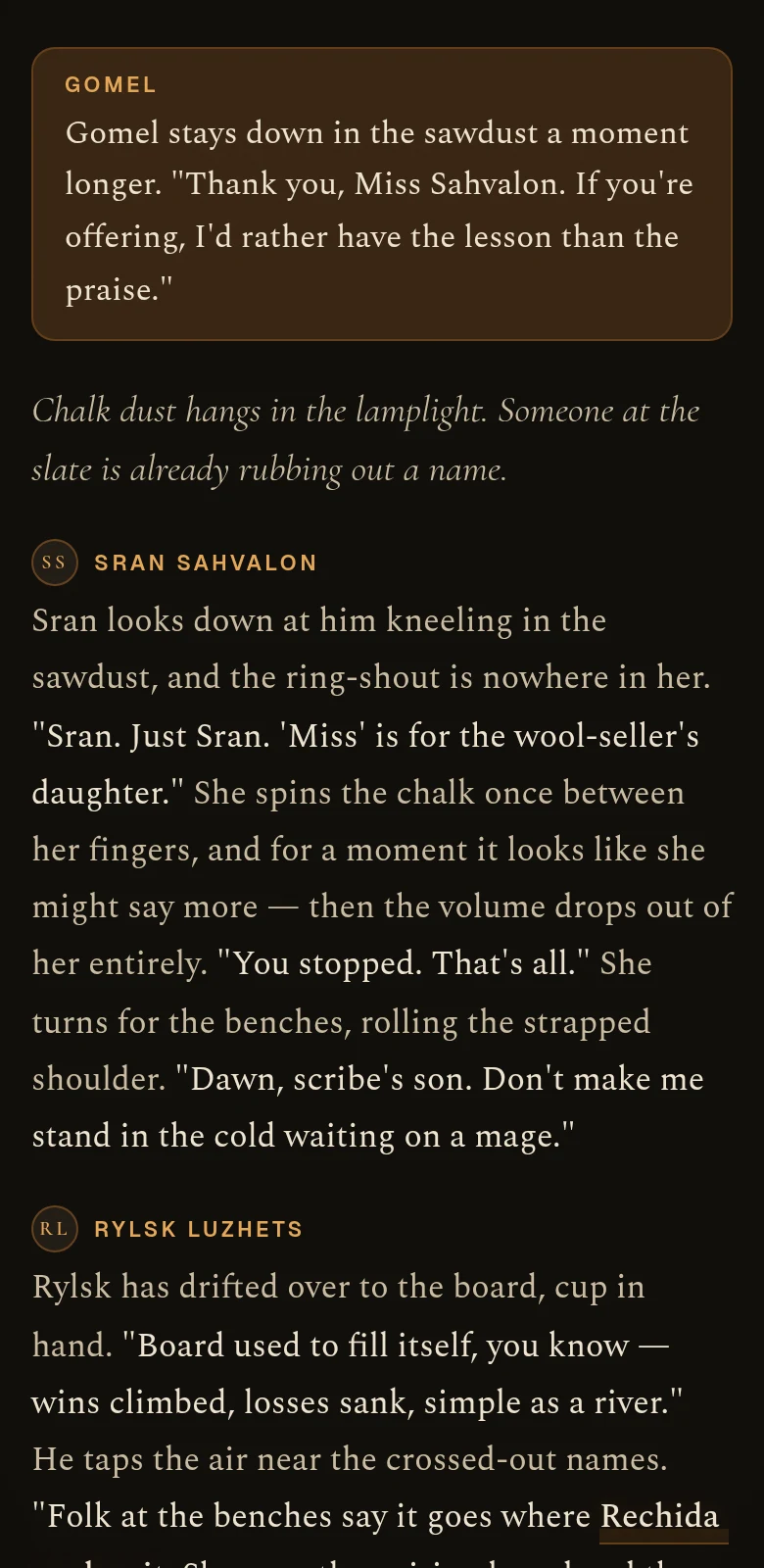
- No more chat bubbles. When someone speaks, their turn is a passage of prose with their name above it and their portrait in the margin, set in a proper book typeface.
- Speech stands out. What people say is set a little brighter than what they do around it, so your eye lands on the dialogue. It works for every way people talk, including the 'tha did nowt' kind.
- Your move opens each beat. Your own turn is the one boxed card on the page, with a thin line before it, so you can always see where each turn starts.
Everything about you, one tap away
The side panel is now your ledger. Your mana, stamina, boons, afflictions and purse sit at the top all the time, and four tabs hold the rest:
- Scene: who's here, the ways onward, and what the world has in store for you.
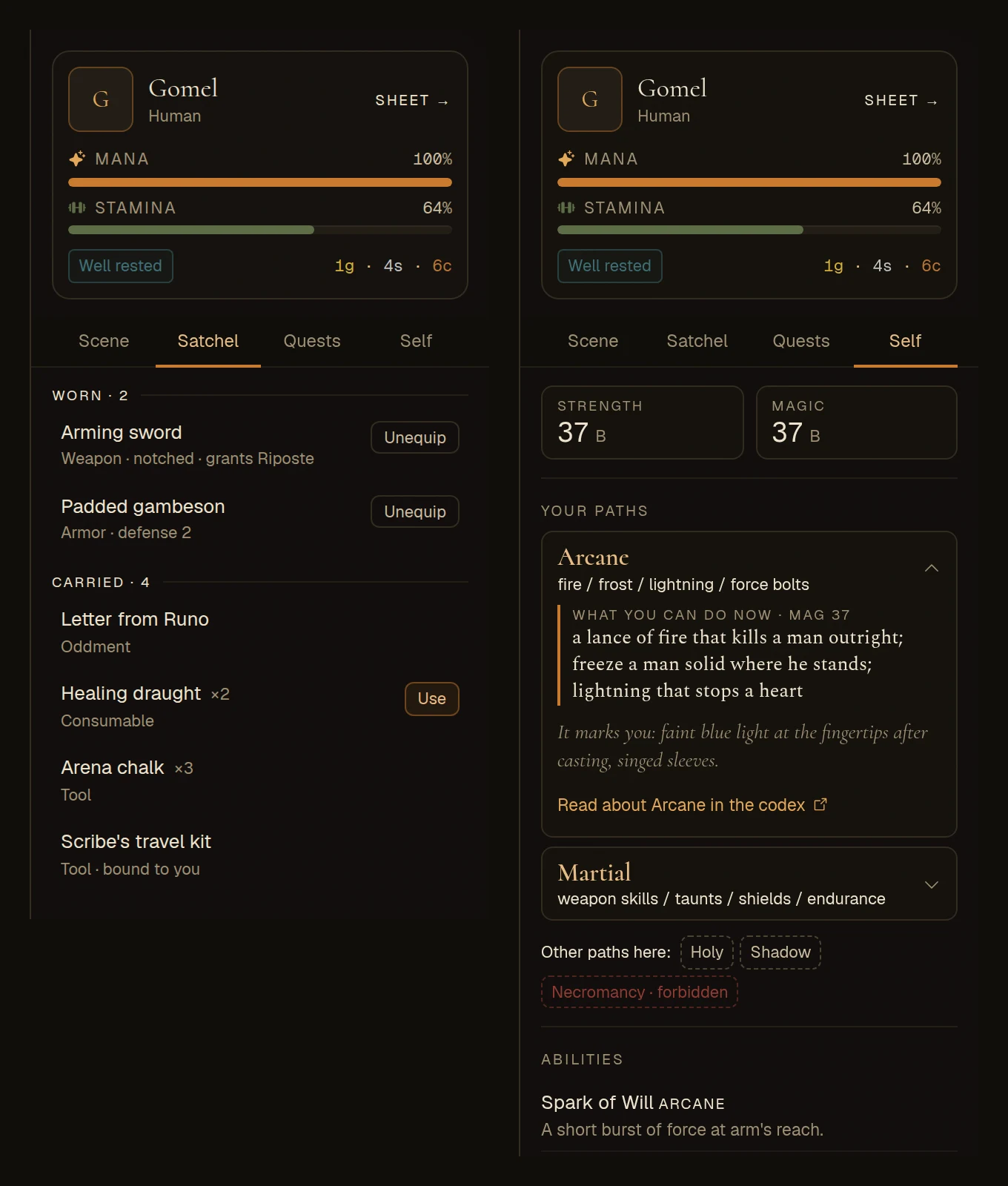
- Satchel: what you wear and what you carry, with each item's condition and any skill it lends. Equip, Unequip and Drop work right there. Use writes the action into your box, so the story decides what happens.
- Quests: your quests and where each one stands.
- Self: your strength and magic, and every ability you have, including ones your gear lends you.
- New things are marked. The Satchel tab shows how many new items you have, and Quests gets a dot when a step moves. When the story hands you something, tap the line that says so and the right tab opens.
Magic in your world's own words
- Each world names its own magic. The heading uses what your world calls it: paths, currents, rites, schools.
- Tap a path to see what it can do. You'll see what you can do with it at your rank right now, what opens up at the next one, the mark it leaves on those who use it, and a link to the codex.
- Learn the rest of your world's magic. The paths you don't have are listed below yours, with the forbidden ones marked. Tap any of them to read about it.
Who's here, and who can hear you
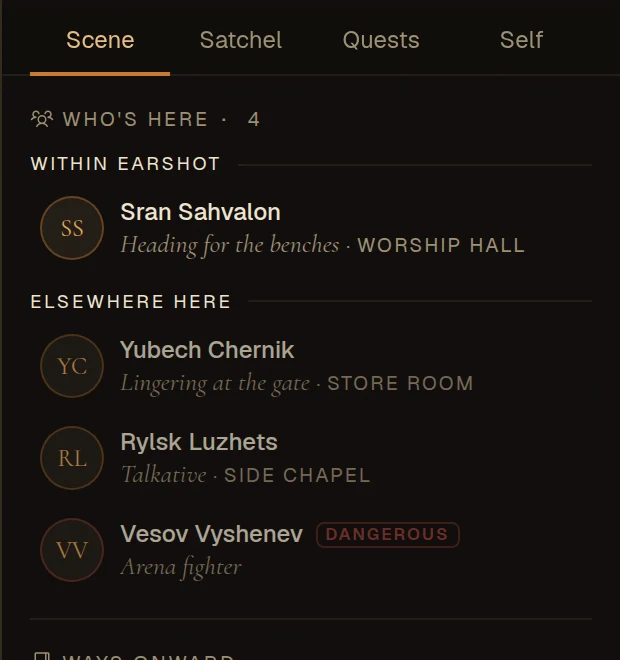
- Everyone says what they're doing. No more "Arriving" next to every name: each person shows what they're up to, their mood, or their trade.
- Inside a building, earshot comes first. The people who could overhear you are listed first, under Within earshot, and everyone shows which room they're in.
- Dangerous people are marked. A clear Dangerous tag instead of a small red dot.
Fights get a stage
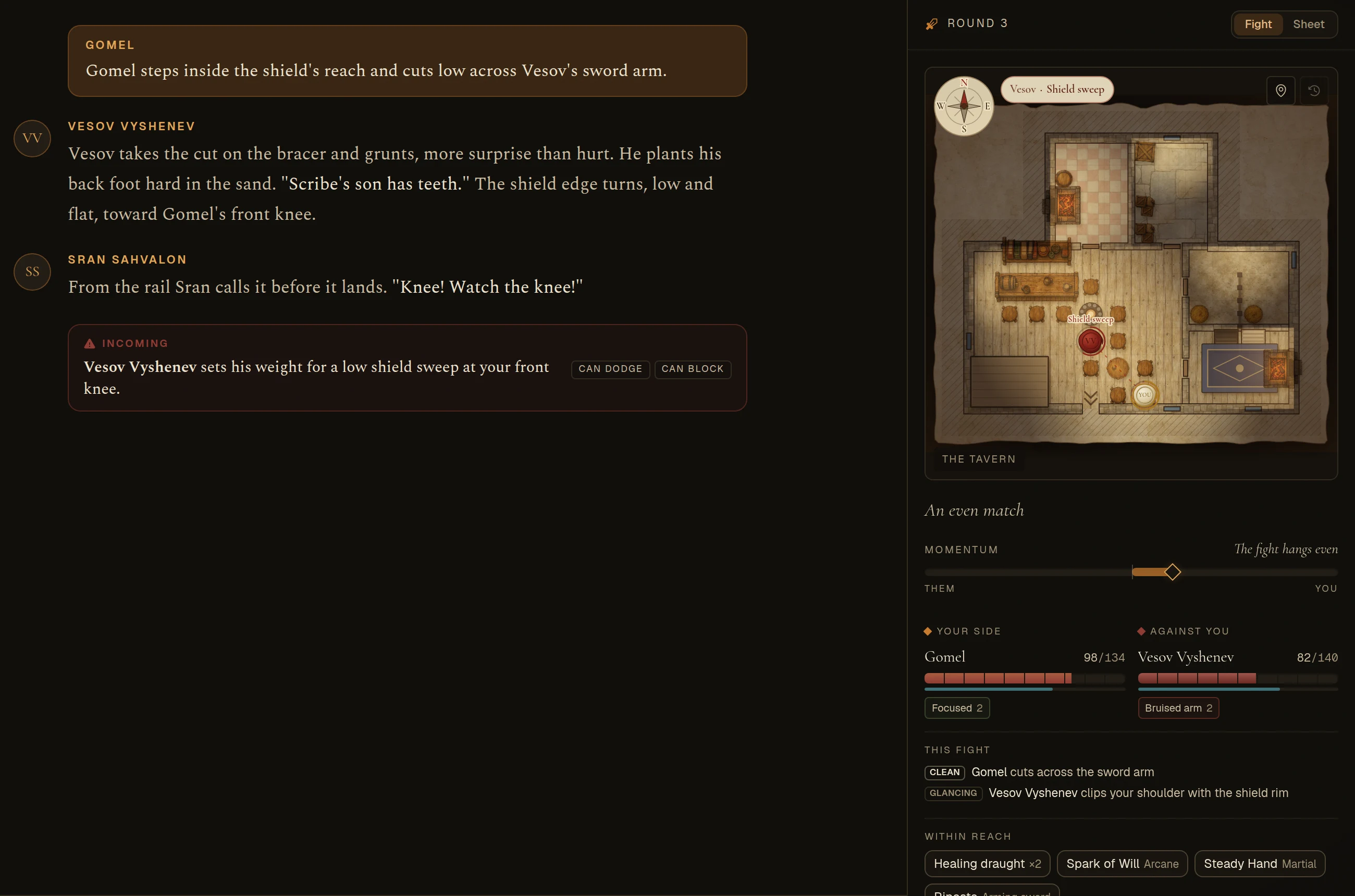
On a computer, a fight now takes one wide panel beside the story instead of crowding both sides of the screen.
- The battle map at a real size, with both sides' health and effects right under it, the matchup in words, and the last few exchanges.
- What's within reach. Your potions, your skills and the skills your gear lends sit under the fighters. Tap one to write it into your box.
- The warning where you act. What your enemy is winding up sits right above the box you type in, with whether you can dodge it or block it.
- Your sheet is one tab away if you need it mid-fight.
Phones
- The box you type in gets the width. One small button flips between the story and table talk, Undo lives in the ⋯ menu, and the box stays on one line.
- Suggested replies are one row you can swipe sideways, instead of three rows pushing the story up.
- The story fills the screen. Passages use the full width, with the speaker's portrait next to their name.
- Your ledger slides up from the bottom, with your health in it, and the story stays readable above it.
- A tidier header. The place name has room, your health is on the ledger button, and sound, music, the log mode, chat and Undo are in the ⋯ menu.
Back goes where you came from
- From your character page, back takes you to the scene you were in, not the map.
- Inside a building, back takes you to the street or room you walked in from, and then up to the town map.
- The character creator takes you back to your characters if you came from there.
- Credits has a back arrow now, and it remembers where you were, even after paying.
Quieter where it should be
- The chat bubble stays on the map. In a scene, it only appears when your party is messaging you. Otherwise Chat is in the header, or in the ⋯ menu on a phone. It no longer shows while you're making a character or reading your sheet.
- No more floating music button. The map and your scene have their own music switch, and the music fades out on pages that don't have one.