
Features · The World Studio
An AI world builder you can edit by hand or in words
The World Studio is where a Worldtable world gets made. AI can draft as much of it as you like, and every part stays yours to change: the map and its towns, the peoples, the magic, the cast, the money and the rules. This page goes through what you can edit, and how.
Three ways to start
If you want the case for building on Worldtable at all, it's on the World Studio page. This page is the hands-on part. A world can begin three ways, and all three end in the same editor.
- Six questions. What the world is about, how it should feel, the land, peoples and magic, how places sound, and anything else. Worldtable drafts the whole world in a minute or two: premise, regions and their histories, peoples, magic, a cast of notable figures, lore, money and a map. Nothing is saved until you pick Use this world; you can also Draft again or Change my answers.
- The free world generator. The fantasy world generator turns one sentence into a sketch with a map, no sign-in needed. One button under the sketch carries it into a new world: the Studio drafts on the same map you saw, and keeps the sketch's factions, villain and hooks.
- By hand. Skip the wizard and start from a complete set of example peoples, magic, lands and lore, renamed for your world, and reshape it piece by piece.
The Studio's tabs, in order: World, Map, Places, Peoples, Cast, Magic, Lore, Ask, Economy, Power, Rules, AI, Players and Playtest. The building guide covers the whole flow.
Shape the land
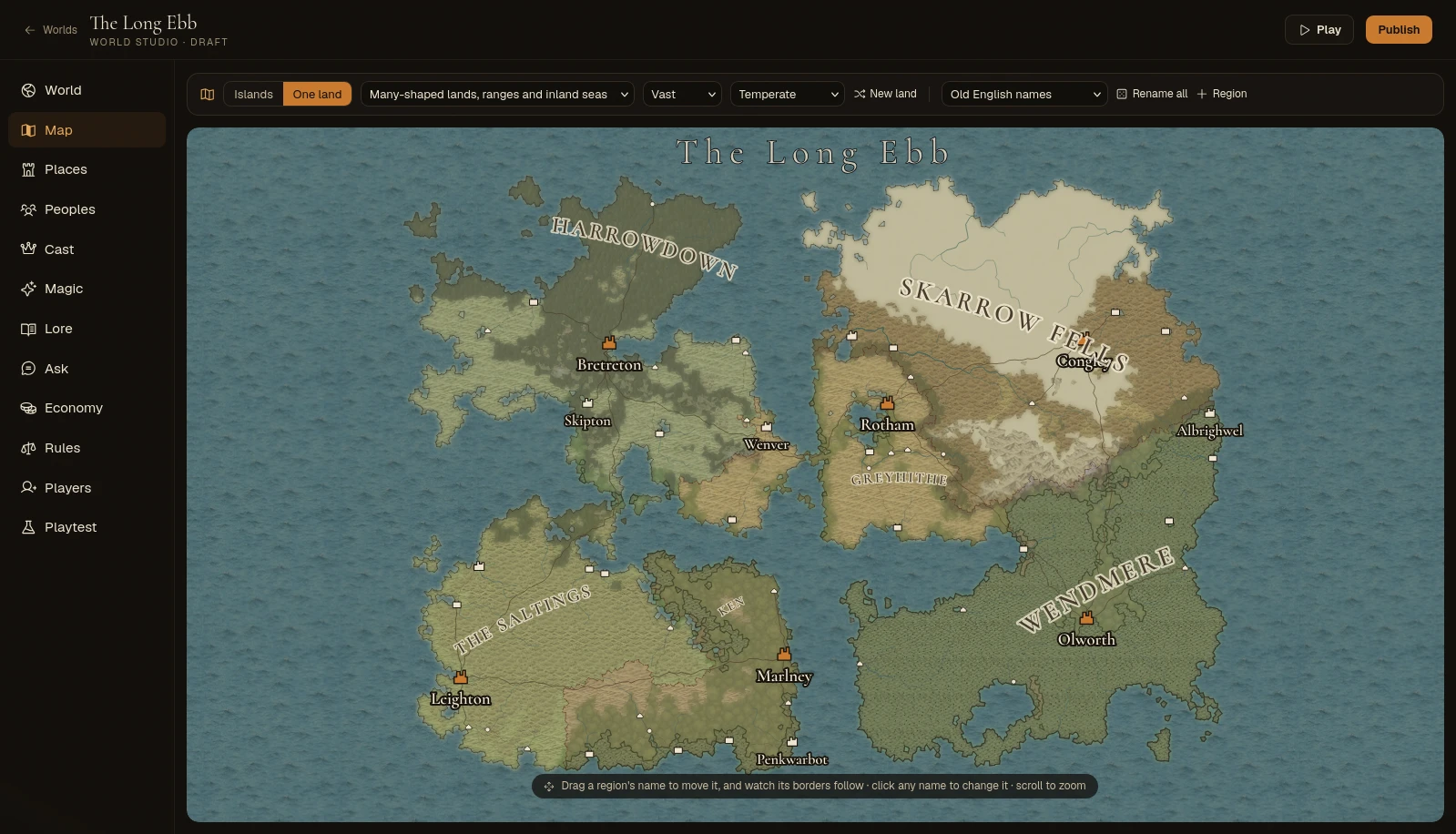
The map is the centre of the Studio, and it's drawn by the game's own generator rather than painted by an AI. You describe it; the engine adds coastlines, slopes, rivers, roads and towns, and redraws about half a second after each change. Engine
- One land or islands. One land is a single landmass split into regions; islands give each region its own island, with travel between them by sea. A map can mix both.
- A shape, a size and a climate. Fourteen shapes, from two great continents to a ring of atolls; small, medium or vast; cold, temperate, warm or every climate from pole to tropics. New land rolls a different one.
- Or draw it. Paint sea, land, hills and mountains over a rough picture of the land, with undo and redo. Rough is fine: the generator does the coastlines and rivers.
- Move a region by its name. Drag the name and its borders regrow as you move. When you let go, nothing else shifts.
- Name everything by typing, or roll a name in one of twenty-three naming styles, per region or for the whole world. The fantasy name generator runs on the same engine, if you want to browse names first.
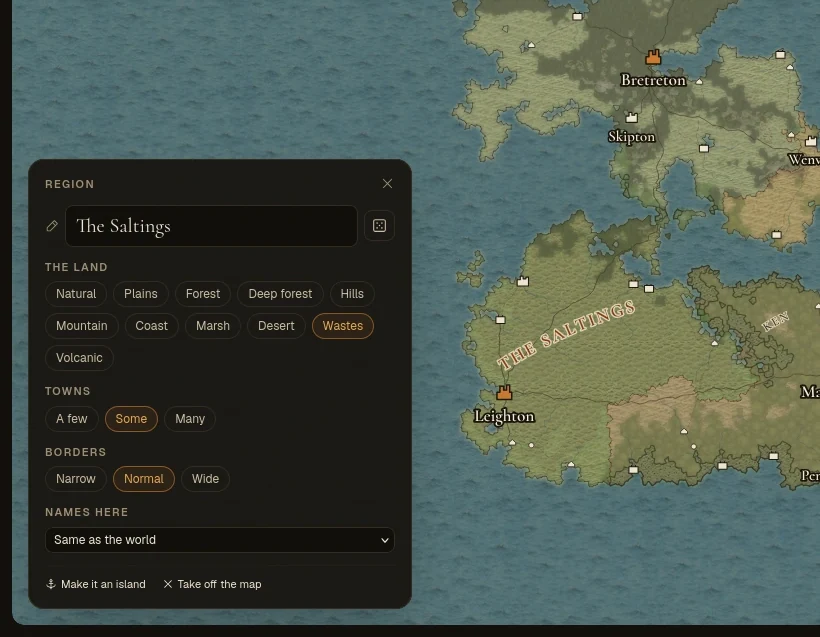
- The land
- Plains, forest, hills, mountain, coast, marsh, desert, wastes, volcanic and more. It raises or flattens the ground and pulls the climate.
- Towns
- A few, some or many.
- Borders
- Narrow, normal or wide: how far the region reaches against its neighbours.
- Names here
- Its own naming style, or the world's.
- Take off the map
- The region still exists (people can hear of it) but can't be reached.
A map holds up to 40 islands or landmasses, and a landmass up to 24 regions. You can also put gates to other realms in any region, sealed or open; a sealed gate can't be opened by anything a player tries. Engine
Place towns and landmarks by hand
The generator founds towns for you, and then they're yours to move. + Town puts one anywhere on land, so the lonely mountain village can be exactly where you want it. Drag a town and its roads re-route.
- Sizes. Any town can be a capital, city, town, village or hamlet. Each region has one capital: crown another town and the old one becomes a city.
- Town lore. Click a town to write what it's like, who runs it and what's wrong there. Its people and places are made from that lore when players first arrive, and the storyteller keeps it.
- Landmarks. Landmark places a ruin, shrine, tower, cave, monument, grove, standing stones or camp. Give it a name and the line players find out when they arrive, and mark it Hidden until found if you like. In play, a landmark opens as its own location.
- Dungeons. Any landmark can have a dungeon dug under it. See dungeons.
Write the peoples, magic, cast and lore
Some of what you write is held by the engine; some is handed to the storyteller every scene. The Studio is honest about which, and so is this page: Engine means code enforces it, Storyteller means the AI is told and trusted to follow it.
Peoples
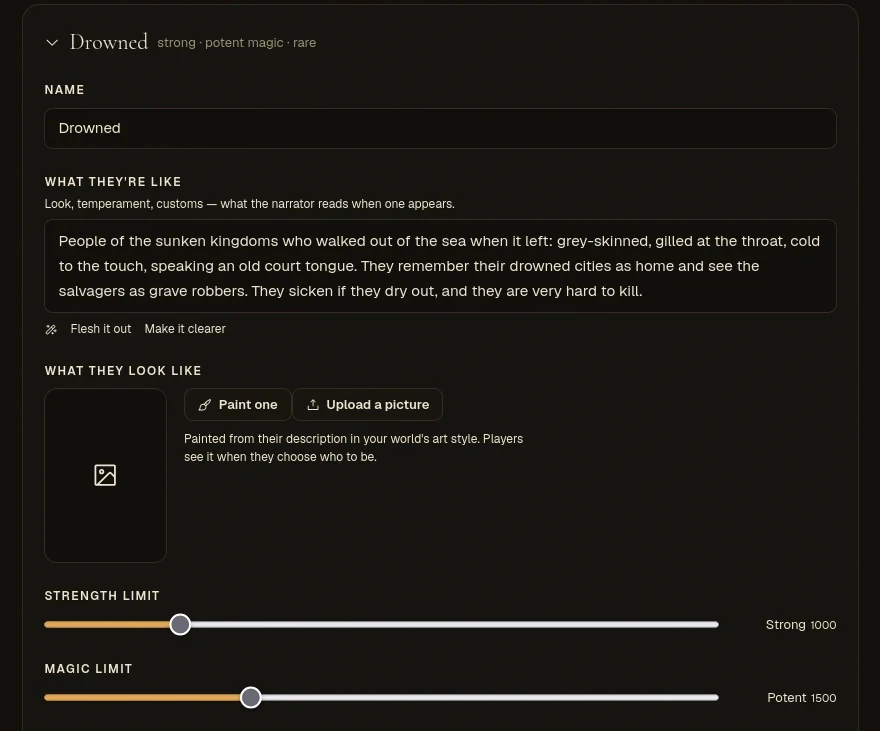
- How strong each people can get and how much magic they can hold, from Frail to Legendary and None to Arcane-born. Characters can't be made or grow past those limits, and a people with no magic can't take up a school. Engine
- Where they live decides who players meet in that region's towns. Engine
- Transformations, from a nudge to a rebirth; the count is a hard limit. Engine
- A picture, painted from their description or uploaded. Players see it when choosing who to be.
Magic
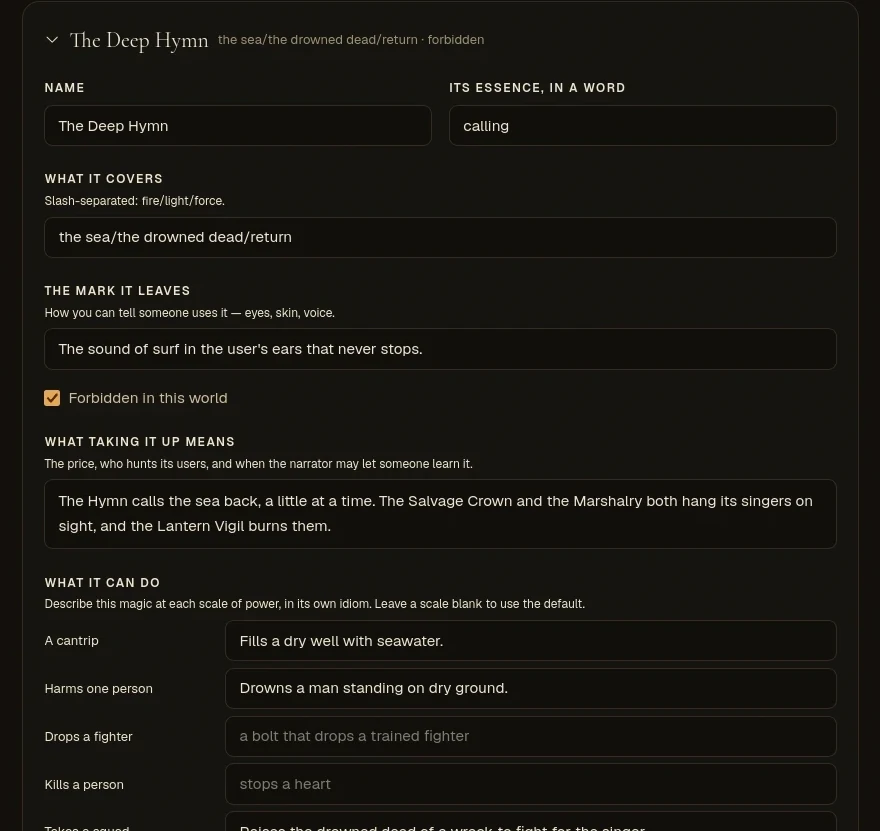
- Switch it off, or call it schools, currents, paths, arts or your own word.
- Describe what each kind does at each scale, from a cantrip through killing a person to breaking a fortress. The storyteller shows it that way; what an effect costs is priced by the engine. Engine
- Characters can only take up your world's kinds of magic. Engine Mark one forbidden and write the price, and the world reacts to those who use it. Storyteller
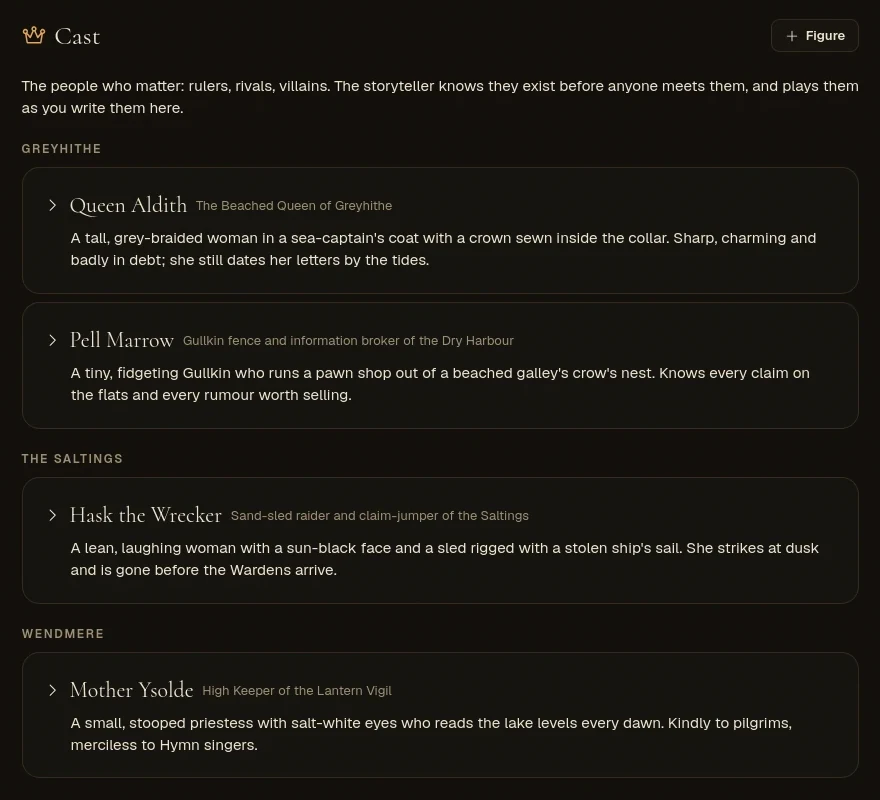
The cast
The people who matter before anyone plays: the queen, the guildmaster, the rival, the thing in the lake. Each gets a role, a home region, a people, who they are, what they want, a secret and how dangerous they are in a fight.
- The storyteller knows them all, and won't invent a second holder of a role you've filled. Storyteller
- When one steps on stage they're built from what you wrote, and they're the same person every time after. Engine
- Their danger stays under your world's ceiling on the most dangerous thing it may create. Engine
Places and lore
- Places gives each region the one line that makes it unlike anywhere else, its history, who holds power, its taboos and how dangerous it is. Storyteller
- Lore holds the facts a narrator must keep straight: history, legends, customs, creatures. The storyteller looks an entry up when a scene touches it, including by the other names you list for it. Storyteller
- World holds the premise, the tone and the truths that always hold here, like “no resurrection” or “the dead walk at night”. Storyteller
Long text boxes have a helper: Write one for me when empty, Flesh it out or Make it clearer when filled, each with an undo. The Studio docs go through every tab.
Money and markets
- Your own coins. Up to four, with plurals, short forms and how many of each smaller coin a larger one is worth. Say what the smallest coin buys and prices follow. Players see amounts in your coins everywhere, and rewards are paid in them. Engine
- A price guide and a line on how trade works, which the storyteller bargains around instead of making numbers up. Storyteller
- Local prices. A region or a single town can be cheap, dear or ruinous, price particular things its own way and trade by its own customs. The storyteller charges what the player's current place charges. Storyteller Sea passage costs what the port charges. Engine
Rules in plain words
Start from a feel (Classic, Heroic or Grim) and change only what you want different. The Rules tab has about twenty rules, each picked as words, and nearly all of them are held by code: the storyteller is told the rules, but the engine refuses what they forbid. Engine
- When a hero falls
- They die for good, or they're beaten and wake later. With death off, the kill is refused and the hero is downed instead.
- Companions
- None, one, a pair, a small band, a company or any number. Past the cap, the next one won't follow.
- Players fighting each other
- Allowed or not. When not, robbing, harming or killing another player's hero outside a shared fight is refused.
- The biggest reward
- Modest to no limit. Larger grants are cut down to it.
- Great powers can scar the map
- Craters, razed towns and new roads kept on everyone's map, or none at all.
The Power tab names your ranks and sets how high a mortal can climb, how fast heroes grow and the most dangerous thing the world may bring. Every rule and what it changes is in World rules.
Or just tell Hob what to change
Hob is the Studio's helper, in the corner of every tab. Ask in plain words: “give the north a witch queen and put her in the cast”, “rename the towns of this region so they sound Norse”, “drop a ruined tower somewhere wild in the marsh”. You watch each step as it happens, each change shows up in the Studio at once and saves like your own, and Undo under a reply takes back everything that reply changed.
- What it can edit: peoples, magic, lore, cast, region lore, economy, power names and rules. On the map, it can rename regions and towns, write town lore, place, edit and remove landmarks, and change a region's land while the world is a draft.
- What stays with you: drawing the land, and adding, moving or removing regions and towns, on the Map tab. The storyteller model is on the AI tab.
Before players arrive, the Ask tab lets you question your world as the storyteller would answer, marked by how much of the answer your canon actually settles, and Check the whole world reports contradictions, gaps and loose ends. Hob and Ask both run on your world's AI.
Playtest, publish, invite
- Nothing is lost. The Studio saves as you type and keeps your last twenty versions, any of which can be restored. The whole world, map included, exports and imports as one file.
- Playtest a draft. Walk in with a throwaway hero, then Start over: play records wiped, your world untouched.
- Invite players. Invite links work on drafts too, so testers can come in early. You can cap each player's turns a day and pictures.
- Publish. The land is fixed and the world goes live. Give it a public page with its map, lands, peoples and magic (never your rules or your cast's secrets), and let visitors ask to join. Worlds with a public page are listed under Published worlds on the worlds page.
Players make a character for your world and type what they do. An AI narrates and voices everyone; the engine decides the travel, the fights, the money and who remembers what. See Players and keys.
Pick the AI that runs it
The AI tab holds your key and the one model that does all of your world's writing. It changes cost and voice, not the engine.
- OpenRouter. Pick from OpenRouter's list, each model shown with its price, a rough cost per 100 turns and how fast it has been answering lately. Only models that can use tools are listed, because every turn needs them.
- Any OpenAI-compatible provider. Give the API address, key and model. Worldtable sends one test message before saving and warns you if the model didn't use a tool.
- A model on your own computer. Serve it with Ollama, LM Studio or KoboldCpp, and reach it through a tunnel such as Cloudflare Tunnel or ngrok: the address has to be public and start with https.
- Pictures. Scene pictures and portraits have their own models and art direction. They, and read-aloud, need an OpenRouter key; on another provider you can still upload pictures.
Your key is stored encrypted and used only for your world. Players play on your credit or your key, never their own.
Questions
- Is there an AI world builder that makes a map?
- Yes. The World Studio draws a real map for every world: pick one of fourteen shapes of land (or paint your own) and the generator raises the terrain, runs the rivers, lays the roads and founds the towns. The map itself isn't AI art. It's game data: players travel it kilometre by kilometre, and the AI storyteller can only send them to places that are on it.
- Can I edit what the AI generates?
- All of it. A drafted world is a starting point: every region, town, people, school of magic, character, lore entry, coin and rule stays editable in the Studio, by hand or by asking Hob, the Studio's helper. Changes save themselves, the last twenty versions are kept, and edits reach play at once.
- Can I use my own AI model?
- Yes. On the AI tab you can pick any tool-capable model on OpenRouter, or connect any provider that speaks OpenAI's chat API with its address, key and model. That includes a model on your own computer (Ollama, LM Studio or KoboldCpp, for example), reached through a tunnel such as Cloudflare Tunnel or ngrok, since the address has to be public and use https.
- Can players play in the world I build?
- Yes, that's what it's for. Send invite links, or publish the world with a public page where people can ask to join, and it's listed among the published worlds. Players make a character for your world and type what they do; an AI narrates and voices everyone, and the engine decides travel, fights, money and what each character remembers.
- Is the world builder free?
- Building is free, and your first $1 of AI is on Worldtable: enough to draft a world and play it for a while. After that, the world's AI runs on your own key, so you pay your provider directly for what your players use. Players never pay.
- Can I change the map after people start playing?
- Publishing fixes the land: coastlines, regions, borders and where towns stand stop moving, because characters live there. Names of regions and towns, town lore and landmarks stay editable, and so does everything off the map: peoples, magic, cast, lore, money and rules.
Build a world and see it run.
Six questions get you a drafted world in a minute or two. Building is free, and your first $1 of AI is on us.