Nov 6, 2026playparties
Private tables
Play any world with just you and the friends you invite.
You can now play any world at a table of your own: just you, and the friends you invite. Nobody else sees what happens there, and nothing you do there changes the shared world.
Starting a table
- Choose when you make a character. The character sheet now asks Where does your story happen?
- The shared world is what it has always been. Other adventurers walk the same towns, and you meet them. What you change, they see.
- A private table is yours. Nobody else sees your story, and nothing you change reaches the shared world.
- The character belongs to the table. A character made at a table stays there. You can't move a character between the shared world and a table, at least for now.
- You can host up to three tables of each world.
Inviting friends
- Only the host invites. Open the Party tab at your table and choose Bring friends to your table.
- Invite someone you know. Pick a friend's character from the shared world. The invite goes to them alone, and they see it in their Party tab and on the Worlds page.
- Or send a link. A table link works six times and lasts two weeks.
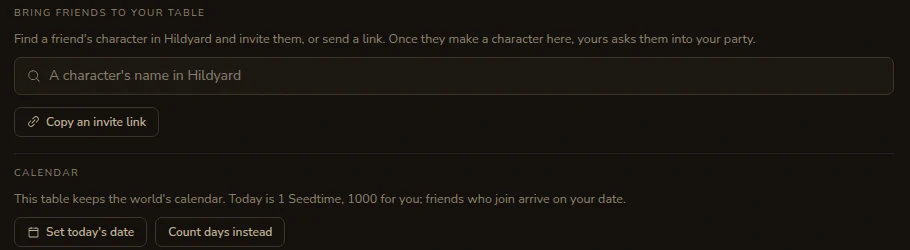
- They take a seat. Your friend makes a character at your table. Once it exists, your character sends them the usual party invite, and you play together as a party.
The same world, on its own
- Everything the builder made. A table plays the world exactly as its builder made it: the same map, towns, people, lore, rules and plugins.
- It stays up to date. When the builder updates the world, every table gets the change straight away.
- What happens at a table stays there. The people you meet, who lives and dies, what you build or burn down, rumours about you, your reputation: all of it belongs to your table. In the other direction, nothing from the shared world's play leaks in.
- Hidden from everyone else. Tables don't appear in the worlds list, on public pages or in the roster of adventurers.
- Credits work the same. Each player pays for their own turns, as in the shared world. If the world runs on its builder's own AI key, so does the table.
Your table, your call
- The Game Master takes your word. At your table, if you tell the Game Master in table talk that something went wrong with your character, it puts it right. You don't need the story to prove it.
- It still tells you the truth. If you ask for something the story never gave you, like a pile of gold or a legendary sword, the Game Master says it never happened and how it might spoil the game. If you're sure, press Approve and it's done.
- Every change waits for your yes. At a table, every change the Game Master makes to your sheet, including undo, comes as a card for you to approve or decline.
- The world's own rules. The rule that keeps explicit play out of a town's main rooms is for the shared world, where everyone meets. At your table the world's own rules apply. The 18+ check on your account still does.
- Dates, if the world has a calendar. See the Calendars post: a table shares one date, so festivals come round and you can wait for a named day.
Finding your way around
- Your other characters. Your character page now has a You also play line, with your characters in other worlds and at other tables. Pick one to switch to it.
- Tables say whose they are. On the Worlds page, a table reads as "World: your table" or "World: name's table", with the character you play there.
- Back to the shared world. When you're making another character at a table, you can choose to make it in the shared world instead, and keep what you've written.
For builders
- On by default. Private tables are allowed in every world. Turn them off in Studio › Players › Private tables.
- Tables have no Studio. Only you change the world's design, and every table follows it.